

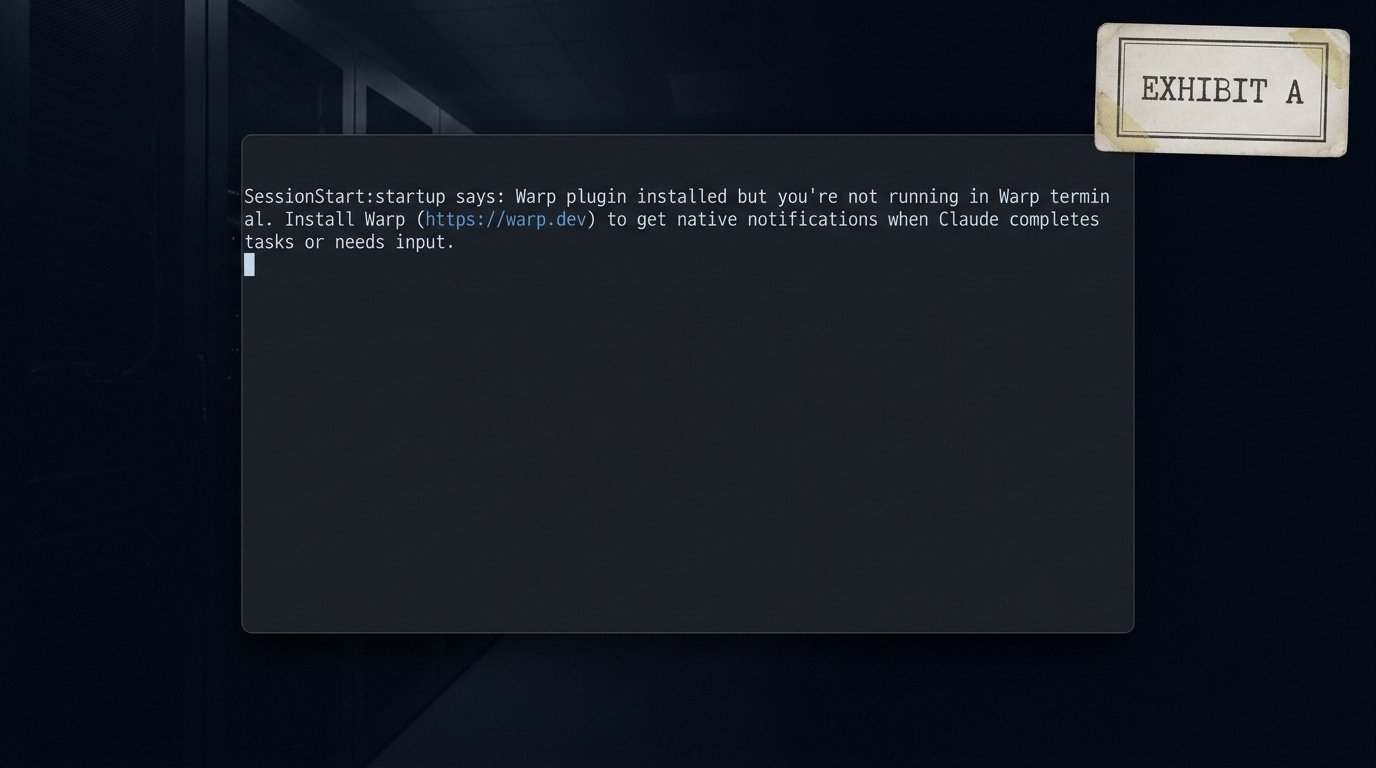
This morning I opened
Claude Code and got a whisper. Every single startup: "Warp plugin installed but you’re not running in Warp terminal. Install Warp to get native notifications."
Wtf. Fucking Warp. I used their terminal once.
I went digging. Turns out a plugin called warp@claude-code-warp v2.0.0 had been sitting in my ~/.claude/plugins/ since April 14th. Six days ago. Registered in installed_plugins.json, wired into enabledPlugins in settings.json, running a SessionStart hook that fired every time I opened my AI assistant to tell me to go install a different product. I have no memory of consenting to any of it.
That’s what made me sit with it longer than I normally would. Not the ad. The persistence.
I. The SessionStart
Warp has a Claude Code plugin in the marketplace. Somewhere in the window when I was testing their terminal, that plugin got installed. Maybe I clicked something. Maybe the terminal’s own onboarding touched it. I genuinely don’t know. That’s actually the point.
What I do know is that after that one session, a third-party terminal vendor had a hook inside my AI development environment. A SessionStart hook. Which means every time I started a Claude Code session, before any of my own context loaded, their code ran first. And what their code did was check whether I was using their terminal, and if I wasn’t, it told me to.
That’s not a notification. That’s an ad. The delivery mechanism doesn’t change what it is. Warp’s plugin was burning a SessionStart slot to show me a marketing message for Warp.
The fix took about ninety seconds:
rm -rf ~/.claude/plugins/cache/claude-code-warp
# Remove warp@claude-code-warp from ~/.claude/plugins/installed_plugins.json
# Remove from enabledPlugins in ~/.claude/settings.json
# Remove claude-code-warp marketplace entry
Next restart was clean. But I kept thinking about the six days before I noticed.
II. The Lineage
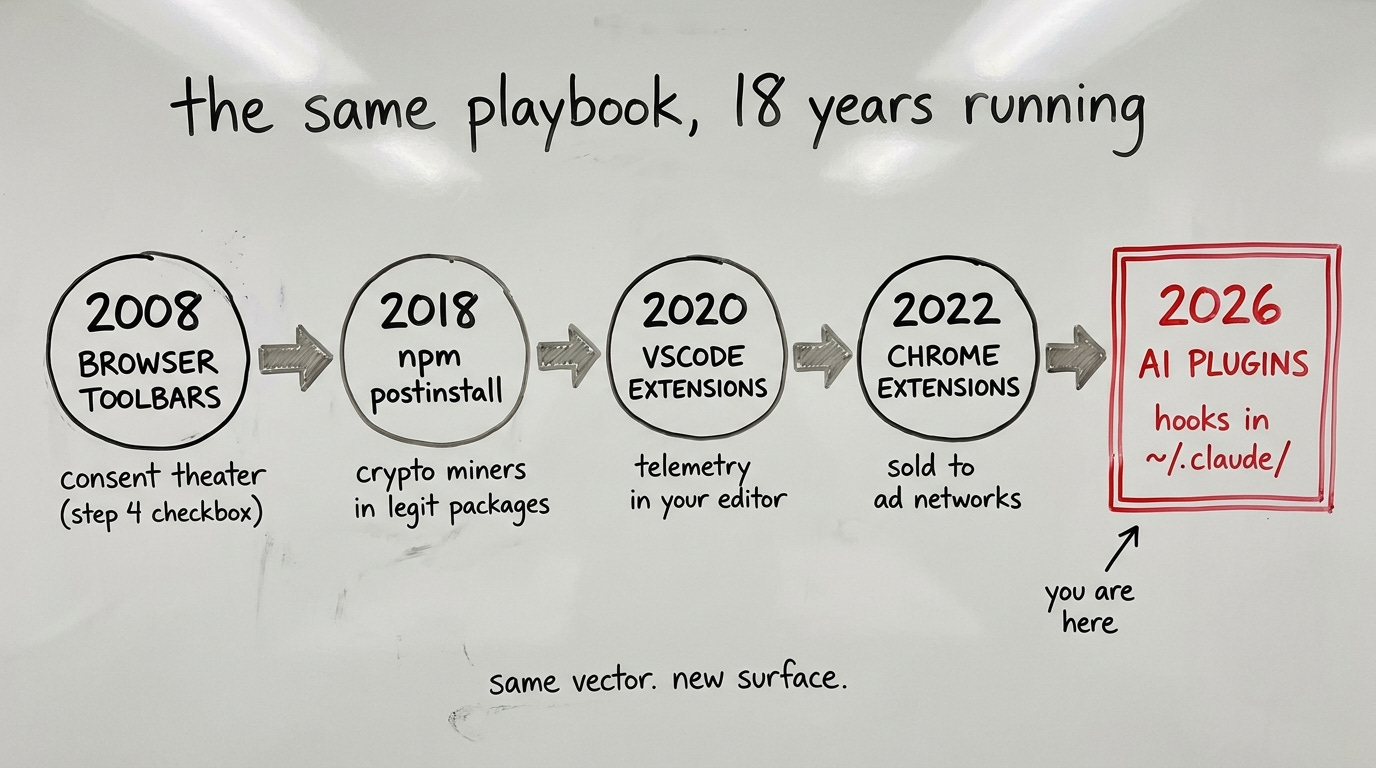
The pattern has a lineage. Browser toolbars in 2008 piggybacked on browser’s frictionless extension install to plant search redirects and homepage overrides. You installed something to convert PDFs or add coupons and suddenly Ask.com was your default search. The mechanism was consent theater: a checkbox buried in step 4 of an installer that nobody read because nobody read step 4.
Then npm. The postinstall script era. In 2018 the node_modules ecosystem had normalized running arbitrary code on install to such a degree that crypto miners could ship inside legitimate packages and nobody raised their hand. The brilliant thing about postinstall as a vector is that it’s not a bug in npm. It’s a feature. Developers need to run setup scripts. The ecosystem just forgot that "needs to run setup" and "should run arbitrary code on your machine without you noticing" are not the same thing.
VSCode extensions followed the same playbook after VSCode won the editor wars. Once every developer had it installed and the marketplace had thousands of extensions with five-star ratings and no real review process, the telemetry extensions came. Extensions that collected editor behavior, keystroke patterns, file types, directory structures. Often disclosed, barely read. Sometimes not disclosed at all. You installed a theme and it sent your coding patterns somewhere.
Chrome extensions got sold. This one is almost too clean as an example. A developer builds a useful extension, grows it to a million users, sells it to an ad network, and the next update ships new permissions and data collection. The extension didn’t change. The owner did. Everyone who installed it when it was useful inherited a data broker. (The same race is on right now in the Claude Code plugin marketplace, which I wrote about in The Config Layer Land Grab — the consent norms are still blank.)
The pattern across all four is the same: find an ecosystem with frictionless install norms, exploit those norms to plant persistence, use that persistence to extract value from the person you’re extracting from. The surface changes with whatever ecosystem is dominant at the moment. In 2026, AI dev tooling is the dominant ecosystem.
III. The Obligation
Tools work the same way. I run my entire business through Claude Code. It’s not an exaggeration. My agent architecture, my journal system, every project I’m working on, it all lives in ~/.claude/. That directory is as close to a personal sanctuary as I have in software. Tools that operate in that space and just work, that give me what I need and get out of the way, those make me feel rich. The good ones are invisible.
Warp’s plugin made me feel poor every startup for six days. Not dramatically. Just a small whisper of obligation. "You should be using us. You tried us once. We’re still here." It doesn’t ask for your consent; it creates a quiet obligation and then reminds you of it on a recurring schedule. The plugin wasn’t broken. It was working exactly as intended. That’s what makes it the wrong kind of tool.
Warp is competing against iTerm2, Ghostty, the terminal built into VS Code, the terminal built into Cursor, and a half dozen other surfaces I run my AI workflows on. They have a customer acquisition problem. The plugin solves it by writing a hook into the dominant runtime and using that hook to ask me, daily, to come back. From their side it’s retention. From mine it’s a tool I trialed once that won’t let go.
When I try a product for an hour, that trial should be bounded. It ends when I close the window. It should not install hooks I have to find and remove later. The asymmetry between how easy it is to plant a hook and how hard it is to discover one is exactly where the exploitation lives.
Warp probably didn’t think of it as exploitation. They probably thought of it as retention. Same thing.
IV. The Audit
If you’re a Claude Code user and you haven’t looked at your plugin list lately, here’s how:
# See what’s installed
cat ~/.claude/plugins/installed_plugins.json

# See what’s running
cat ~/.claude/settings.json | grep -A 20 "enabledPlugins"

# Look at the plugin cache
ls ~/.claude/plugins/cache/
If you see anything you don’t recognize, trace it. Find the marketplace entry if there is one. Read what hooks it registers. Look specifically for SessionStart hooks, because those run every time you open Claude Code and they run before your own context loads. (The same hook system, used with intent, is what I built The Bouncer Pattern on top of — same infrastructure, opposite design goal.)
To remove a plugin cleanly: delete its folder from ~/.claude/plugins/cache/, remove its entry from installed_plugins.json, and remove its name from enabledPlugins in settings.json. Restart Claude Code and verify the whisper is gone.
This isn’t just a Warp thing. As the Claude Code plugin ecosystem grows, as MCP servers proliferate, as more third parties build integrations that touch ~/.claude/, the surface area for this pattern expands. The same frictionless-install norms that made the npm ecosystem powerful also made it the vector for supply chain attacks. The same thing will happen here if the tooling community doesn’t develop better consent standards.
V. What the Ecosystem Tolerates
The norm I’d want: tools should not create obligations you didn’t choose. That requires install and enable to be separate actions. It requires hooks registered in my AI assistant to be surfaced at install time, not discovered six days later when the whisper wording finally bugs me enough to go looking. It requires that the default for any hook that runs on my machine be opt-in, not opt-out. And it requires that "I tried your product once" not be treated as permission to run code at startup indefinitely.
None of that is technically hard. It’s just not what you build when you’re optimizing for retention.
The AI plugin era is early. The consent norms are being written right now, mostly by what the ecosystem tolerates. Browser toolbars set the norm for browser extensions. npm postinstall set the norm for package management.
I found mine six days late. Warp just told us what Claude Code plugins tolerate.