

Shipped a new browser skill today. Someone asked me how it was different from the browser tool we already had. I didn't have a clean answer.
We had been accumulating browser automation tooling across a year of building, and I had never sat down and named what each piece was actually for. They all felt like "browser automation." They are not the same thing at all.
What followed was twenty minutes of forced side-by-side comparison. There are three completely different tools hiding under that label, and they make different tradeoffs on speed, safety, and task shape. Defaulting to the one your framework ships means you're probably using the wrong one.
I. Tiers
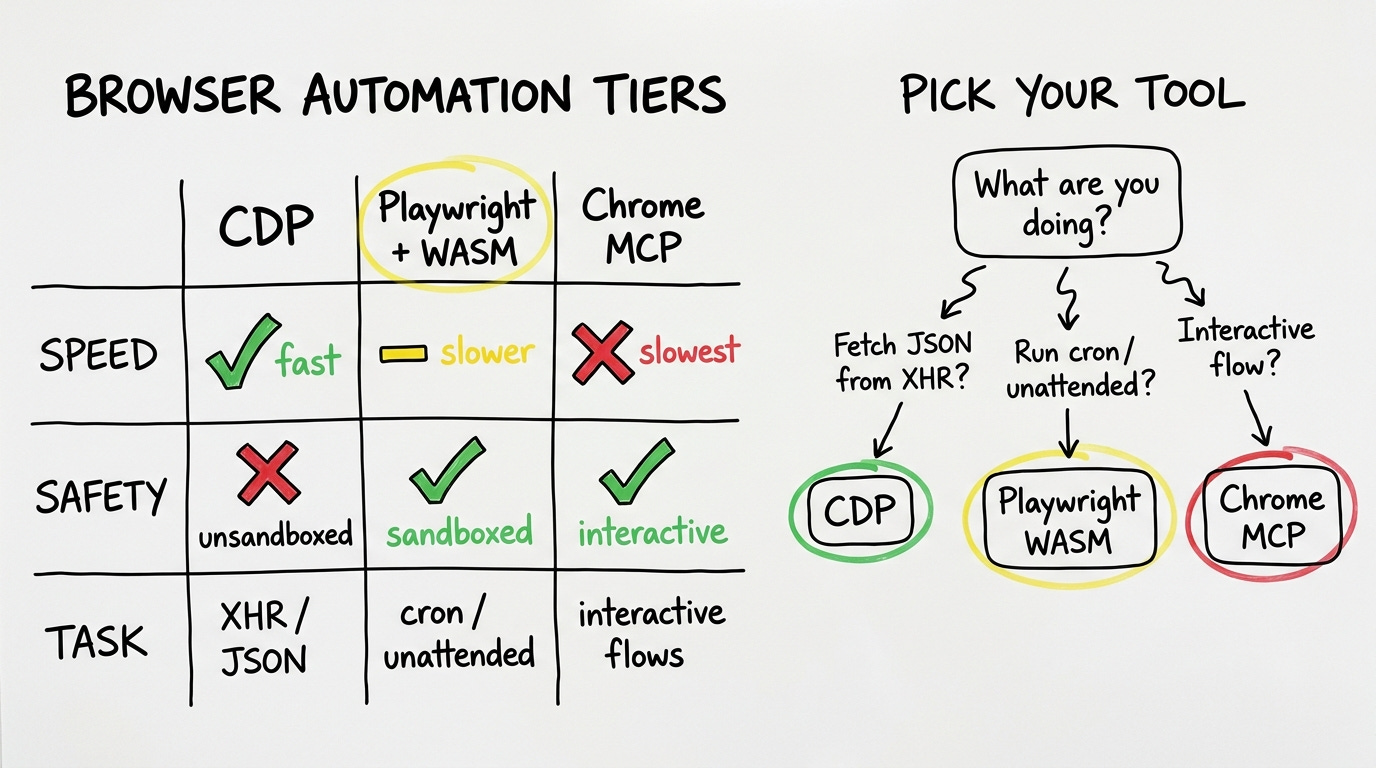
The first tier is raw Chrome DevTools Protocol. CDP direct. A Python script talks to Chrome over websockets, intercepts XHR requests, and pulls the data before it ever renders to the DOM. No Playwright. No framework in between. Just the network call, replayed.
The numbers from production today: a Branch analytics dashboard that took four minutes to navigate manually takes under one second via CDP XHR intercept. A search-rank platform that required five minutes of manual CSV exports took ninety seconds to pull paginated, all 9,226 rows. Both of those are the same underlying operation: find the XHR call the browser is already making, replay it with the existing session cookies, get the JSON back.
The cost of CDP is that there is no sandbox. A Python script running as you, talking to your logged-in Chrome instance, can read and write anything on your filesystem. Every upstream update to a CDP-based skill needs a line-by-line audit. The speed is real but the blast radius of a bad script is your whole machine.
The second tier is Playwright running inside a QuickJS WASM sandbox. This is what DoBrowser ships. Scripts are executed inside WebAssembly, which means they can call browser APIs and nothing else. If a compromised dependency ever snuck in, it's contained to the browser surface.
The tradeoff is roughly thirty times slower than CDP. A typical extraction takes around thirty seconds. Most of my unattended scripts, the ones that run on a cron or in the background while I'm doing something else, use this tier. The eight existing bash wrappers I have for Branch revenue summaries, RevenueCat overviews, spreadsheet reads and writes, link audits, all of them run in the WASM sandbox. The speed loss is acceptable when the script is running without supervision.
The third tier is the Chrome MCP. Browser-use, claude-in-chrome. DOM-aware, visual, interactive. Navigate, click, fill forms, take screenshots, execute JavaScript. Slow. But what it can do, neither of the other tiers can: handle the flows that require a human-shaped interaction sequence. Log into a platform where the login involves solving a CAPTCHA. Navigate a manufacturer catalog that requires clicking through multiple nested dropdowns. Post to a forum with editor state. My B2B deal workflow uses this tier for contact discovery, CRM operations, and cross-app orchestration. The speed is the worst of the three but the task coverage is the widest.
II. Just Fetch
Most devs using AI agents have one of these tiers. Usually Playwright or a Chrome MCP, because that is what the framework they chose ships. The CDP approach is rarely mentioned in agent tooling tutorials because it requires understanding the network layer of what you're automating. It feels lower-level. It is lower-level. It is also faster for a specific class of task that turns out to be very common.
The class: dashboards you're already authenticated to, fetching data via XHR. Branch. Mixpanel. Most analytics tools. Most SaaS dashboards built in the last five years. Your browser authenticates, makes API calls, renders. Intercept the call, skip the render. You don't need a browser automation tool. You need a fetch call.
A few weeks ago I noticed Chrome had been silently routing every download on my machine into a temp folder I'd never opened. Traced it to Playwright. When it attaches to a running browser via CDP, it was overriding the browser's own download behavior, sending every file to a UUID filename in its artifacts directory. 2.6 GB of orphans on my laptop before I noticed. Seven line fix. Merged.
This is the same muscle as the grep/vectors piece here (understand what you're actually doing, don't reach for the complex tool by default). The consensus solution is to reach for the agent framework's browser tool. Not every task that involves a browser is a browser task.
III. Task Shape
Pick on three axes.
Speed: CDP is the fastest by far, under one second for XHR pulls. Playwright-in-sandbox is roughly thirty seconds per extraction. Chrome MCP is slower still. If speed matters, CDP is the only real option.
Safety: The WASM sandbox wins for unattended scripts. The blast radius of a bad CDP script is your entire machine. The blast radius of a bad sandbox script is nothing outside the browser. Chrome MCP sits somewhere in between.
Task shape: This is the one that actually determines the answer. If the task is "get JSON from an XHR endpoint you're already authenticated to," you do not need automation at all. If the task is "run this every night at 2 AM without touching it," you want the sandbox. If the task is "fill out this multi-step form with visual feedback at each step," you want the interactive MCP.
Most of the time the task shape tells you everything. An XHR pull disguised as a browser task wastes thirty seconds of Playwright overhead to do something that takes one HTTP request. An interactive flow disguised as a data extraction breaks the moment a UI element moves slightly to the left.
IV. Invisible
The 302.7% ROAS number from the Branch pull today was invisible before we switched tiers.
Sounds dramatic. It's structurally true. The manual dashboard workflow involved navigating through enough UI layers that certain breakdowns were practically unreachable during a normal review. The CDP pull returns the full nested JSON in under a second. Things that were de facto hidden because they were too many clicks in became visible because the data structure has no navigation cost.
Running all three tiers simultaneously in one production system means you develop an instinct for which one to reach for. The instinct is not about which tool is "best." It is about what you are actually doing.
Fetch the data: CDP. Run unattended: sandbox. Interact like a human: MCP.
The framework isn't the question. The task is.
Trial and Error is an AI R&D lab. RenovateAI is one product (10M+ renders, two years in production). These posts are from building, not theorizing.